Build a Weekly Chore Chart That Matches Your Real Week
A weekly chore chart is most useful when a chore has a real place in the week. Trash can go out on Tuesday, sheets can change on Sunday, and a short kitchen reset can happen after dinner. Chore Chart Builder lets you put those tasks on specific days instead of leaving them in an undated list.
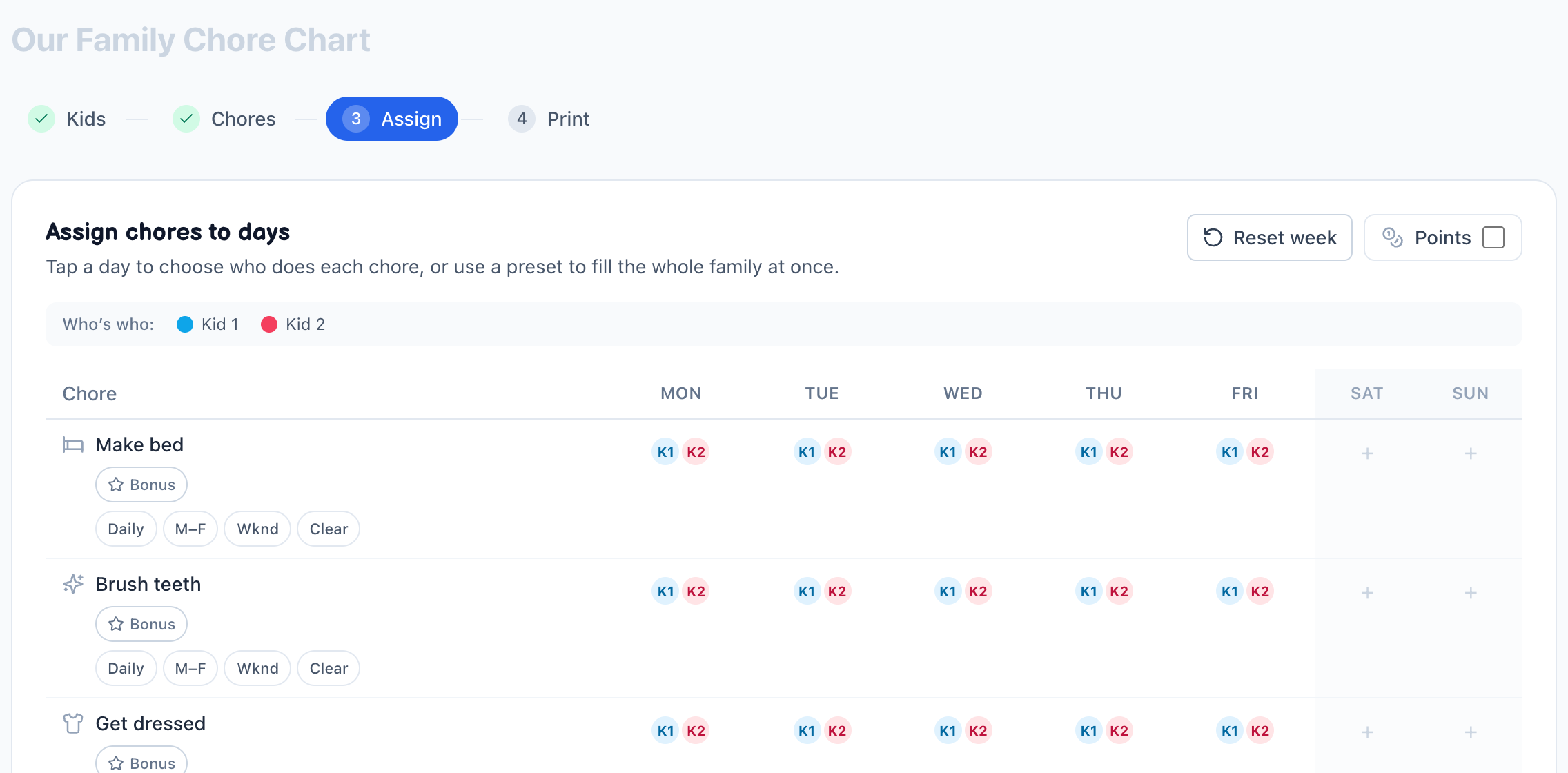
Hypothetical workflow: add two children, choose a small set of chores, assign weekday tasks on the grid, and leave weekend cells empty when the family doesn't need them. This is a product demonstration of the day-by-day output, not a customer story.
Open the free Chore Chart Builder
Build the week, step by step
- Add each child who will appear on the chart. Optional age information changes which library suggestions are easiest to find; it does not force a chore onto anyone.
- Choose chores from the built-in categories or add a custom chore. Start with a manageable list rather than trying to represent every household responsibility at once.
- Assign a day to each task. A chore can go to one child, several children, or everyone on the chart.
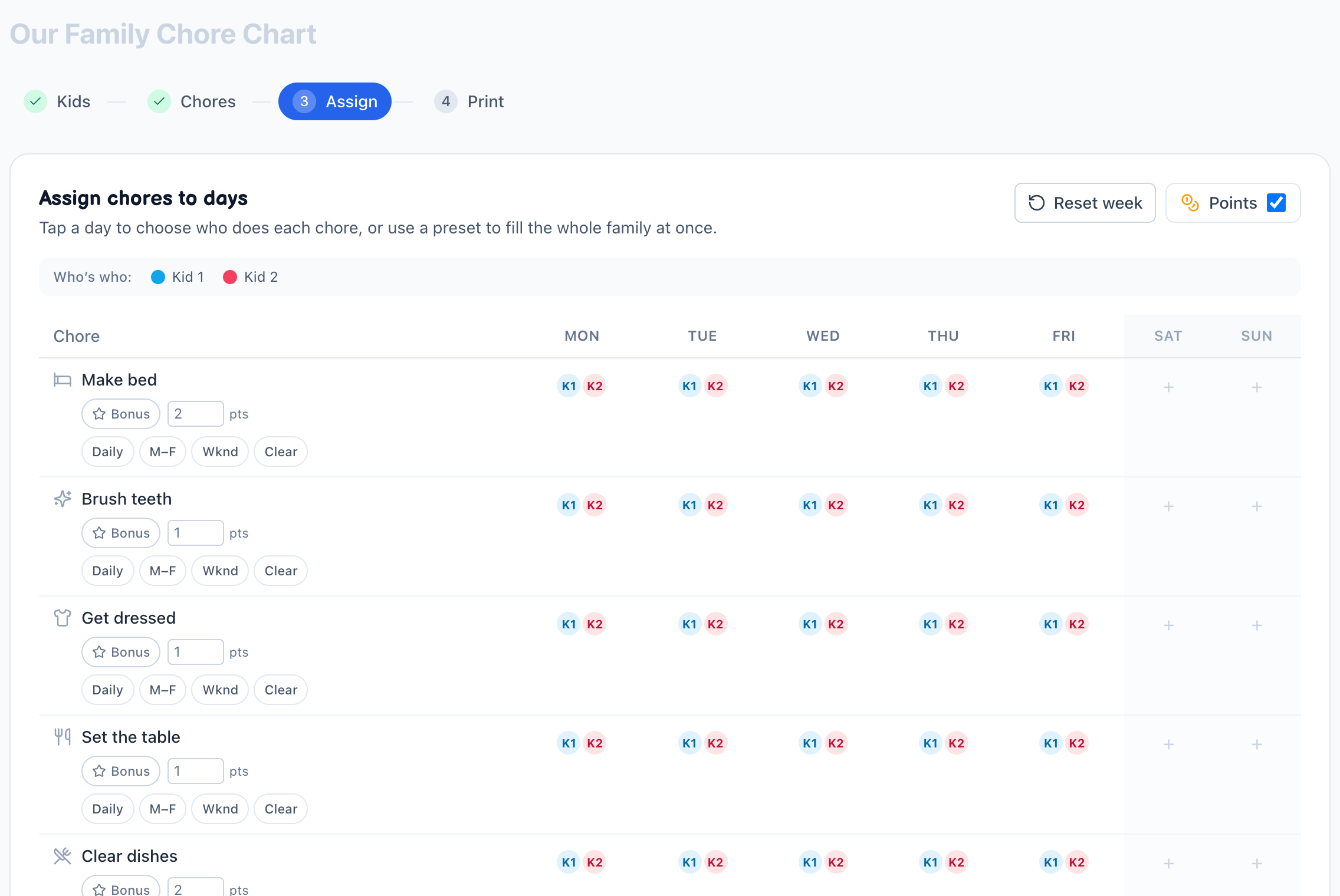
- Use the points toggle only if a workload estimate helps your family make a decision. Edit the values when the defaults don't match your household.
- Review the full Monday–Sunday grid. Look for missing days, duplicate assignments, long chore names, and tasks that need adult supervision.
- Print the family layout or save it as a PDF. Reset the week when the routine is ready to start again; the chart setup stays available in the same browser.
What makes a weekly chart repeatable
Anchor recurring jobs to a day that already exists in the family's schedule. Keep the number of tasks visible, use the same names each week, and change the chart when the routine changes. A repeated chart is a starting structure, not a promise that every week will look the same.
Limitations
The tool does not know school schedules, holidays, travel, ability, time required, or whether a chore is safe without supervision. Review the chart before using it and adjust the assignments to the people and the week in front of you.
Frequently asked questions
- Does the chart cover a full Monday-to-Sunday week?
- Yes. The grid spans all seven days, Monday through Sunday, so you can assign a chore to any single day or repeat it across several. You decide which tasks land on which days, and the layout stays the same week after week.
- Can the same chart be reused every week, or do I remake it?
- You build the weekly rhythm once and it repeats. The grid holds your day-by-day assignments, so when the week ends you simply reprint or reopen the same chart. There's no need to start over — the routine carries into the next Monday.
- Can I put different chores on different days for each kid?
- Absolutely. Each kid appears on the grid, and you place their tasks on whichever weekdays fit. One child might have dishes on weeknights while another handles the yard on Saturday. The whole week stays visible in a single view.
- How do I decide which chores go on which days?
- Match tasks to your household's real schedule. Anchor things to fixed days — trash pickup, laundry, sheet changes — then fill lighter school nights with quick resets and save bigger jobs for the weekend. Seeing the full week at once makes it easy to balance.
- Can I print the weekly grid or save it as a PDF?
- Both. When your Mon–Sun grid is set, print it straight to paper for the fridge or save it as a PDF to keep or resend later. There's no watermark and no account required — the tool runs free in your browser.
- Do I need an account or software to use it?
- No account, and nothing to install. The maker runs in your browser — you'll need a connection to load the page, but once it's open you build and print your chart right there, without signing in anywhere. It's completely free, with no login and no paywall.